Buying a Samsung Galaxy phone can be exciting, but it can also come with one big question: is this phone actually original? Fake Samsung phones can look very close to the real thing, some even copy the Samsung logo, One UI interface, box design, and camera layout, so checking only the outside of the phone is not enough.
The good news is that you can perform several simple checks before buying, or while inspecting a phone you already own. If you want to know how to identify a fake Samsung phone, start with the model number, IMEI, software, Play Protect certification, hardware, and Samsung-specific features, then compare what you find with the model the seller claims to be selling.
Most importantly, don't depend on one test alone. A genuine phone can also be refurbished, repaired, imported from another market, or running modified software. So the goal here is to collect several signs before making a decision. Here are 10 practical ways to check whether a Samsung phone is original or fake.
1. Check the Samsung Model Number First
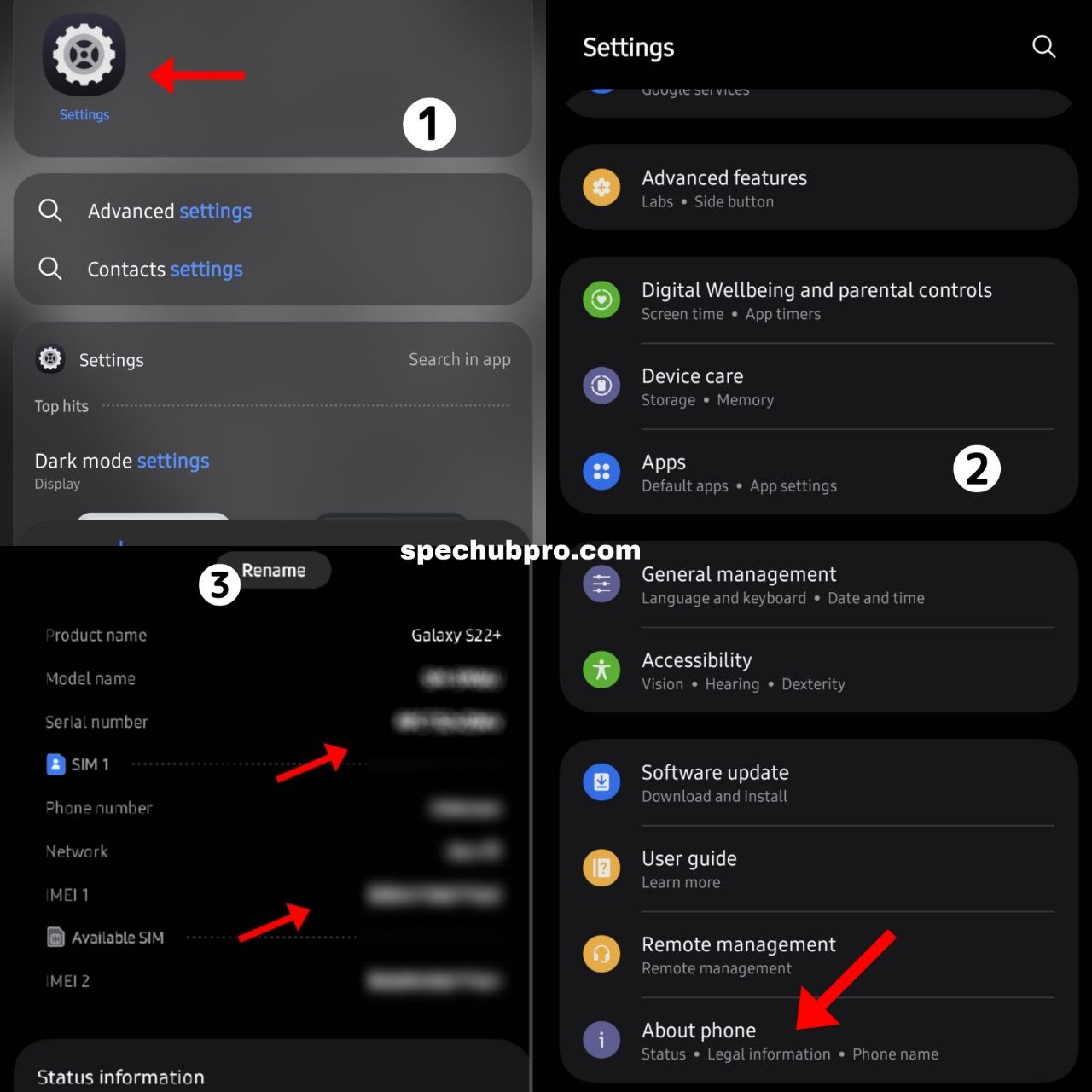
One of the easiest ways to start a Samsung phone authenticity check is to look at the model information stored on the phone itself. On most Galaxy phones, open Settings, then About phone. You should see the model name, model number, serial number, and IMEI listed there. If a seller says you're buying a particular Galaxy S-series model, that information should match what's advertised.
Does the Model Number Match the Phone?
Pay attention to the complete model number rather than just the name shown on the screen. A Galaxy phone can have different variants depending on its market, carrier, or storage configuration, so a different model number doesn't automatically mean the phone is fake. However, a model number that clearly doesn't belong to the phone being advertised is a reason to investigate further. You can also compare the model information against Samsung's official product pages for that device.
Compare It With the Box
If you still have the original box, compare the model information, IMEI, serial number, storage configuration, and product name printed on it with the phone itself. That said, remember that a matching box doesn't prove the phone is original. Boxes can be replaced, reused, or paired with another device, so the phone still needs to pass the other checks below.
2. Check the IMEI Number
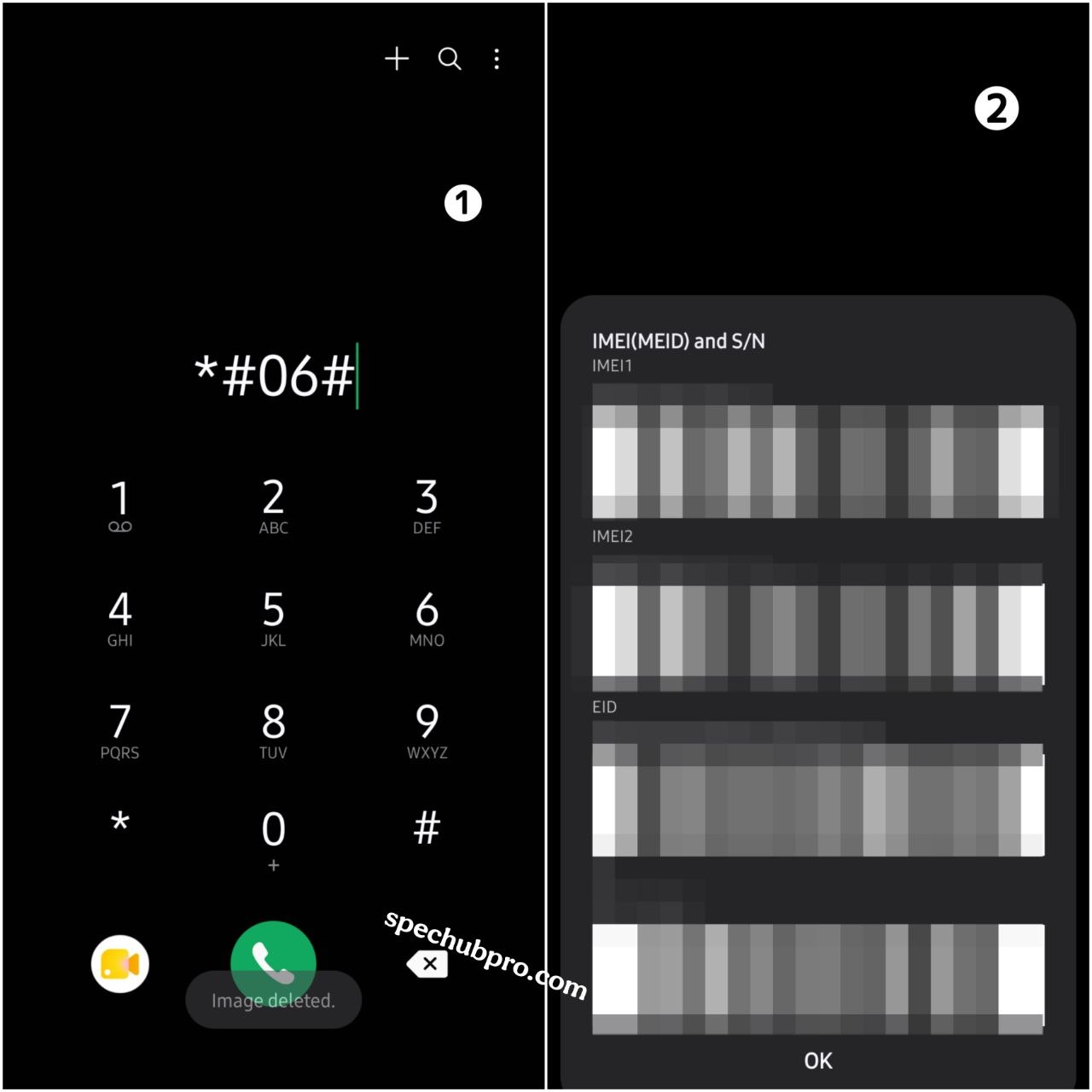
The IMEI is one of the most useful numbers when you want to verify an original Samsung phone. IMEI stands for International Mobile Equipment Identity, a unique identifier used to track mobile devices. To display it, open the Phone app and dial *#06#. On supported devices and networks, the IMEI appears on screen immediately. Compare that number with the IMEI shown under Settings, then About phone, and with the number printed on the box if you have it.
What If the IMEI Does Not Match?
A mismatch deserves attention. There can be a legitimate explanation, such as a replaced mainboard or a box that doesn't belong to the current phone, but it can also indicate that the seller's information is unreliable. Don't immediately conclude the phone is fake based on one mismatch alone; combine this result with the model, software, and hardware checks that follow.
Can IMEI Prove a Samsung Phone Is Original?
Not by itself. An IMEI is an important identifier, but it isn't a magic authenticity certificate. A genuine Samsung IMEI check should lead to a broader verification process rather than just entering a number into a random website. It's also worth keeping your full IMEI private rather than posting it publicly, since it's a device identifier rather than something meant for public sharing.
3. Check Play Protect Certification
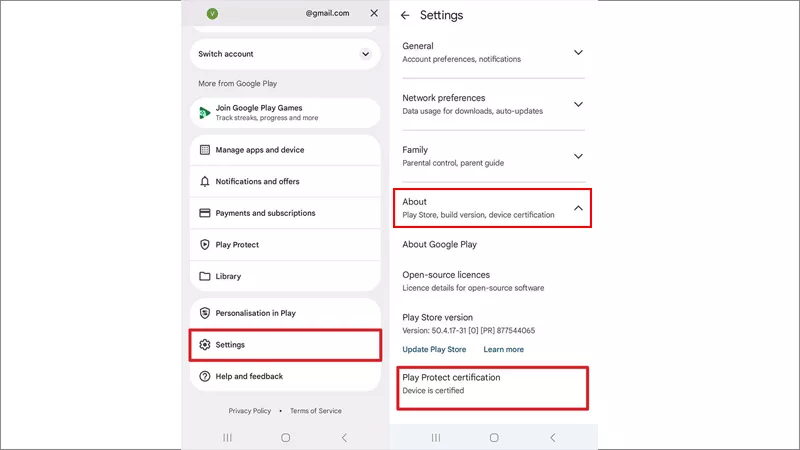
Next, check whether the phone is Play Protect certified. This is especially useful on Android, since Google certification confirms the device has passed Android compatibility testing and is eligible to include licensed Google apps. Open the Google Play Store, tap your profile picture, then Settings, then About, and look for Play Protect certification. A certified device should clearly show that status.
What If the Phone Is Not Certified?
This is an important warning sign, especially if the seller is presenting the phone as a normal, untouched Samsung Galaxy. An uncertified device may have security, update, or Google app compatibility problems. That said, a genuine Samsung phone can sometimes show certification issues because of modified software, an unlocked bootloader, or rooting, so an uncertified status should prompt more checks rather than an instant conclusion.
4. Use Samsung's Built-In Diagnostic Tools
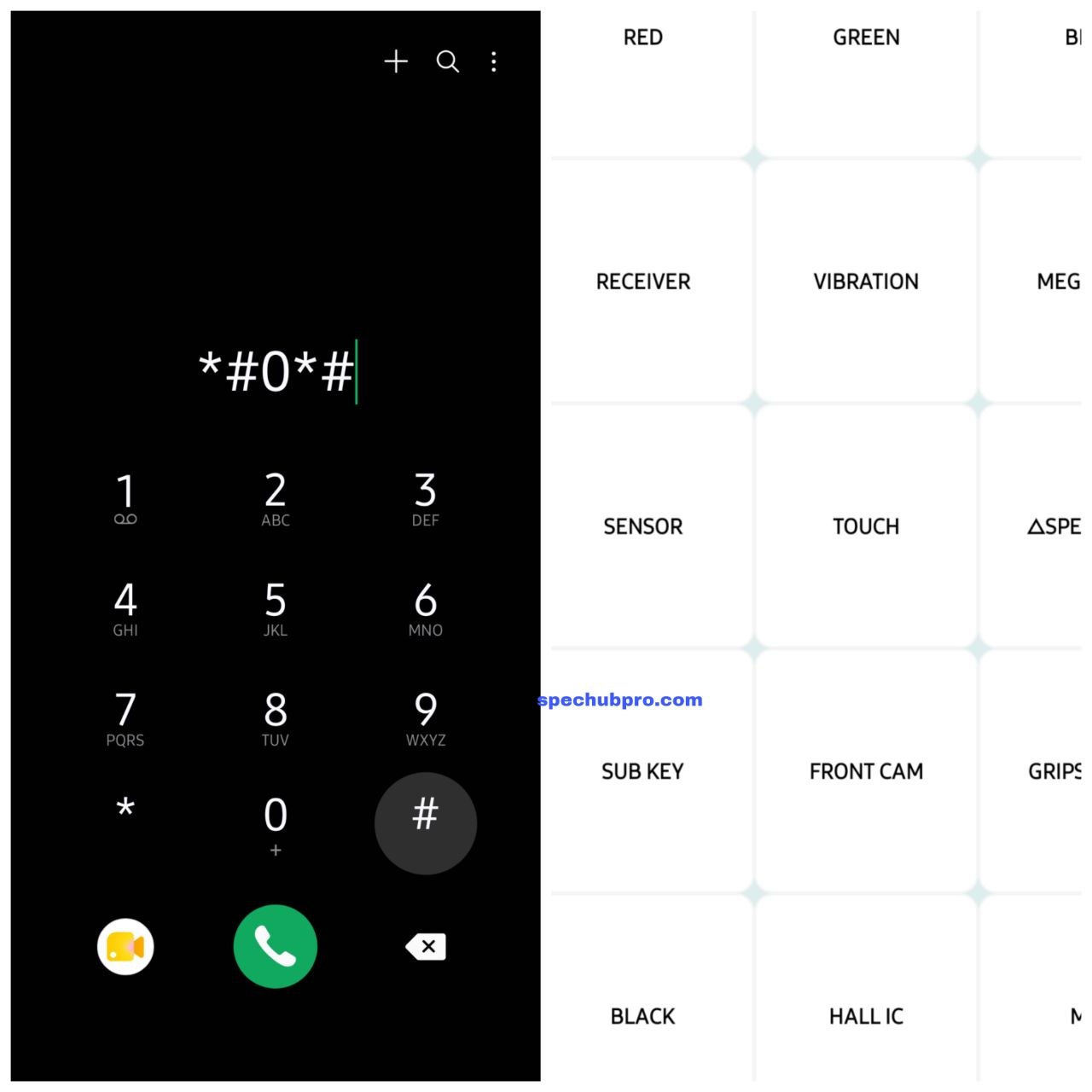
Another useful way to check a Samsung phone is to test its hardware directly. Samsung provides diagnostic tools through the Samsung Members app, which, depending on the phone and software version, can test the touchscreen, speakers, microphone, camera, sensors, battery, vibration motor, and other functions. Available menus and diagnostic features can vary by model and software version.
What About the *#0*# Test?
Many Samsung users also know the diagnostic code *#0*#, which on supported Galaxy devices opens a hardware test menu covering the display, touch input, cameras, speakers, vibration, and sensors. Don't treat the code itself as a guaranteed authenticity test, though. If it doesn't work, that alone doesn't prove the phone is fake, since device model, software version, and carrier configuration can all affect which diagnostic functions are available. Samsung's official Samsung Members diagnostics are the more reliable route when they're available.
5. Check Samsung Software and One UI
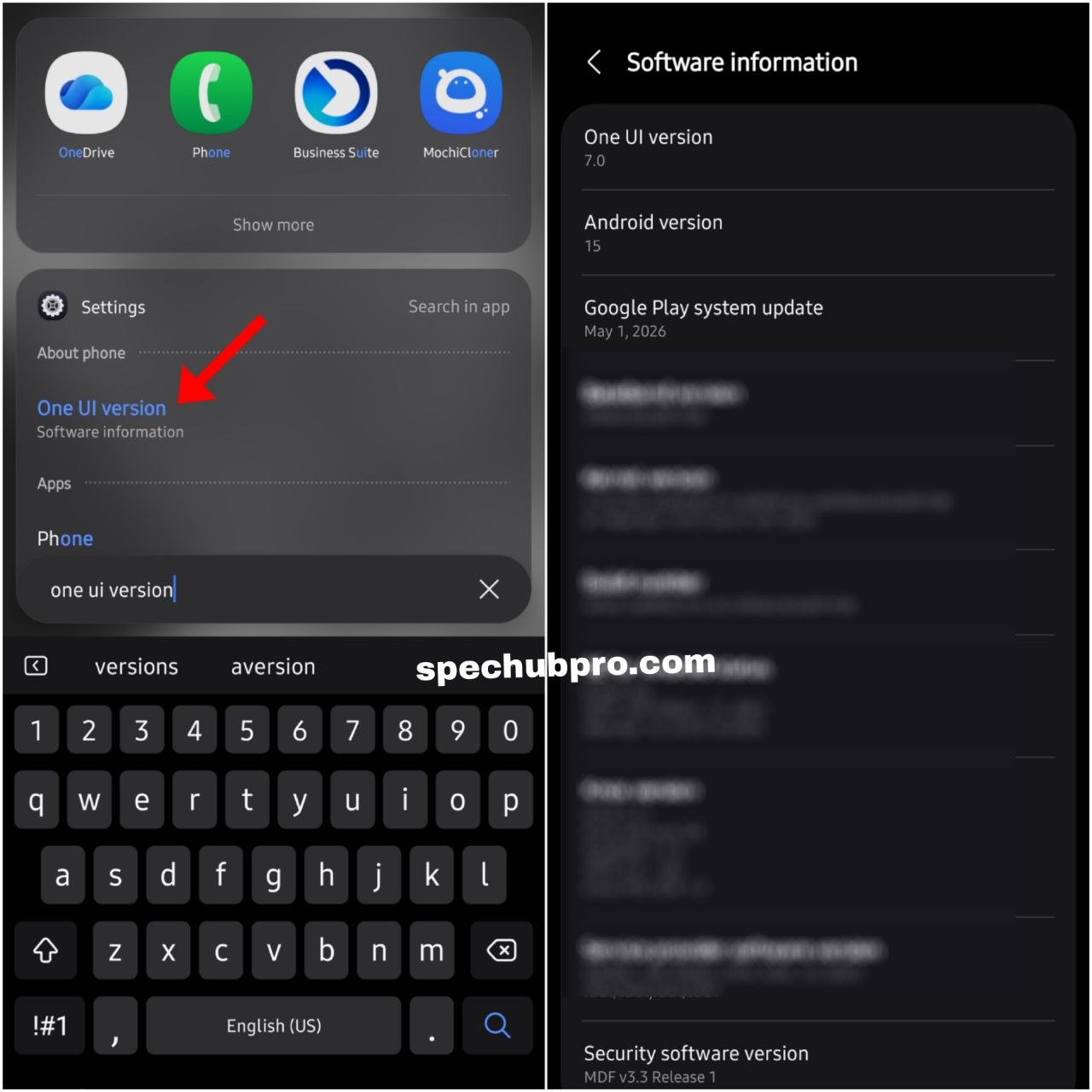
A fake Galaxy phone can copy the appearance of Samsung's interface, so look beyond the home screen. Open Settings, then About phone, then Software information, and check the Android version, One UI version, build number, and security patch information. Then look through the phone's settings more broadly: does the software behave like the Samsung model you were told you were buying? Are the expected Samsung settings available, and does the phone run Samsung's actual One UI rather than a generic Android skin that merely looks similar?
Look for Samsung Features
Depending on the model, you may find Samsung services and apps such as Galaxy Store, Samsung Members, Samsung Account, Secure Folder, Samsung Health, and Smart Switch. The exact list varies between devices, so don't expect every Samsung feature on every Galaxy phone. The key is consistency: if the seller claims the phone is a recent premium Galaxy model but the software looks completely different, or important Samsung services are missing entirely, investigate further.
6. Check Samsung Members
Samsung Members can provide another useful layer of information. If the device is properly recognized, the app shows device information alongside support and diagnostic features, meaning you're not only looking at what's printed on the phone or box, but also checking how the device identifies itself through Samsung's own software. Still, don't treat Samsung Members as the only authenticity test; use it together with the other checks in this guide.
7. Inspect the Display and Build Quality
Now move to the physical phone, where you can often notice clues that software checks might miss. Start with the display and look for poor brightness, strange colors, weak viewing angles, poor touch response, uneven screen edges, dead pixels, unusual bezels, or low-quality screen protection. That said, don't assume every low-quality display means a phone is fake; a genuine Samsung may simply have a replacement screen, especially if it's a used or repaired device.
Check the Buttons and Ports
Press the power button, volume buttons, and fingerprint sensor, then inspect the USB port, SIM tray, speaker openings, and frame for poor alignment, loose parts, rough edges, or materials that feel very different from what the model should have. Again, one physical issue doesn't prove the phone is counterfeit, since a used phone can simply show normal wear or repairs. The goal is to find several signs that either support or challenge the seller's claims.
Check the Weight
Weight can also be useful. If the phone feels much lighter or heavier than expected, compare its official specifications with the actual device rather than relying on your hand alone, since a small difference can come from a case, replacement parts, or normal manufacturing variation.
8. Test the Cameras
Cameras are another good way to tell if a Samsung Galaxy phone is fake. Don't just open the camera app and take one picture; test every camera the phone is supposed to have, switching between the main, ultra-wide, telephoto, and front cameras depending on the model.
Don't Trust the Number of Camera Lenses
A counterfeit phone can have several camera circles on the back while only one or two actually work. Try each camera mode and check whether the framing actually changes; if a phone is supposed to have an ultra-wide camera, switching to ultra-wide mode should produce a noticeably wider view. Also test autofocus, video recording, flash, zoom, the front camera, and camera switching. A camera that exists physically but doesn't function as expected is a useful warning sign.
9. Check the Box, Labels and Accessories
If you're buying a boxed phone, inspect everything carefully: box printing, model information, IMEI, serial number, product labels, seals, accessories, the charger where included, and regional information. The printing should look clean and consistent. However, packaging should never be your only method for checking whether a Samsung phone is original, since a convincing counterfeit can come with convincing packaging, and genuine Samsung phones can also be sold without the original box, especially on the used market. No box does not automatically mean fake.
10. Check the Phone Before You Pay
This is perhaps the most important step if you're buying a used Samsung. Don't hand over your money before testing the phone. If possible, meet somewhere safe and give yourself enough time to open Settings and check the model, check the IMEI, compare the available device information, check Play Protect certification, open Samsung Members, test the display, test the cameras, test the speakers and microphone, test charging, and test the SIM and mobile network.
Test the SIM and Make a Call
If you're buying a second-hand phone, insert your own SIM if possible and check whether the phone can detect the SIM, connect to the network, make calls, send messages, and use mobile data. Also test Wi-Fi and Bluetooth, since a phone can look perfect but still have network or hardware problems.
Check for Account Locks
Before paying for a used Samsung, make sure the previous owner has properly removed their accounts and that the device isn't still locked to another person. Ask the seller to complete the necessary reset and setup process while you're present, so you don't discover after payment that the phone can't be properly activated.
Fake Samsung Phone Warning Signs
If you want a quick fake Samsung phone check, look for several of these signs together:
- The model information doesn't match the advertised phone
- The IMEI information doesn't match across the device and available records
- Play Protect reports that the device is not certified
- Samsung software looks unusual or incomplete
- Important Samsung services are missing
- Cameras don't work as expected
- The display quality seems very different from the claimed model
- Buttons or ports have poor build quality
- The box information doesn't match the device
- The seller refuses to let you test the phone
- The price is unusually low without a clear reason
Remember, one warning sign doesn't always mean the phone is fake. An uncertified device can have software-related causes such as a modified operating system, and a genuine used Samsung can have replacement parts. The more useful approach is to look for multiple independent warning signs before drawing a conclusion.
Can an Original Samsung Phone Still Have Problems?
Yes, and this is an important point, because original and new don't mean the same thing.
Original but Refurbished
A refurbished Samsung can be a genuine Samsung device that has been repaired or restored. That doesn't automatically make it counterfeit, but the seller should describe the phone honestly rather than presenting it as brand new.
Original but Repaired
A genuine Galaxy may have had a replacement screen, battery, camera, charging port, or other component. A phone with a replaced screen can still be an original Samsung; the important question is whether you're buying it as a repaired device or as a brand-new, untouched phone.
Original but Imported
Samsung sells phones for different markets, and genuine devices can be imported, so a model made for another region isn't automatically fake. Regional differences can, however, affect network bands, SIM support, software features, and warranty coverage, so check the exact model number rather than judging an imported phone only by its name.
How to Check a Samsung Phone Without the Box
You don't need the original box to perform most of the important checks. Start with Settings, then About phone, and check the model number, serial number, and IMEI. Next, check Play Protect certification through the Play Store. After that, inspect the software, Samsung Members, display, cameras, speakers, charging port, SIM connection, and other hardware. If you're wondering how to check a Samsung phone is original without the box, the box is useful, but it's far from the only source of information available to you.
How to Check a Used Samsung Phone Before Buying
If you're buying second-hand, take your time and follow this order before paying:
- Check the model. Make sure the phone matches the seller's description.
- Check the IMEI. Use
*#06#or Settings and compare the available information. - Check Play Protect. Make sure the device has the expected certification status.
- Check Samsung software. Look at One UI, Android version, build information, and Samsung apps.
- Test the hardware. Check the screen, touch, speakers, microphone, cameras, vibration, charging, and buttons.
- Test the network. Use your SIM if possible, make a call, and test mobile data.
- Check the account status. Make sure the previous owner has removed their accounts and the phone can be set up normally.
- Check the physical condition. Look for cracks, dents, water damage, loose parts, and signs of major repair.
- Ask questions. Ask how long the seller has owned it, whether it's been repaired, and whether it's refurbished.
- Pay only after testing. This matters most when buying from an unfamiliar seller.
What If You Already Bought a Samsung Phone and Suspect It Is Fake?
Don't panic. First, record the model number, IMEI, serial number, software version, and Play Protect status you've found. Keep your receipt, order details, seller messages, and any other proof of purchase. Then compare the phone's information with Samsung's official specifications and, if necessary, contact Samsung support or an authorized service location.
If you bought the phone from an online marketplace or retailer and it was advertised as an original Samsung but appears to be misrepresented, keep all your evidence before contacting the seller or platform, and avoid immediately modifying the phone or installing unknown verification apps in the meantime.
Quick Samsung Authenticity Checklist
| Check | What to Look For |
|---|---|
| Model | Matches the advertised Galaxy model |
| IMEI | Device information is consistent |
| Serial number | Matches available records where applicable |
| Play Protect | Expected certification status |
| Software | Samsung/One UI information makes sense |
| Samsung Members | Device is recognized; diagnostics available where supported |
| Display | Quality and touch work as expected |
| Cameras | All advertised cameras function |
| Speakers & Microphone | Clear sound; records and calls work |
| Charging & SIM | Charges normally; network connection works |
| Account | No previous-owner lock |
| Box | Information matches the device |
| Seller | Allows proper testing before payment |
People Also Ask
Conclusion
Knowing how to identify a fake Samsung phone doesn't require special equipment. Start with the information already available on the device: the model number, IMEI, serial number, software, and Play Protect certification. Then move on to Samsung Members, hardware diagnostics, cameras, display, charging, network, and the physical condition of the phone.
If you're buying a used Galaxy, take even more time. Test the phone before paying and ask whether it's been repaired or refurbished. Most importantly, don't let one check make the entire decision for you, a matching IMEI doesn't tell the whole story, and a software problem doesn't always mean the hardware is counterfeit. Combine the model, IMEI, software, certification, hardware, cameras, network, and seller information together, and when those pieces agree with each other, you'll have far more confidence that the Samsung phone in front of you is the device you were promised.
If you're shopping for a new Galaxy and want to make sure you're comparing the right models, our Samsung Galaxy S26 Ultra review and best Android phones of 2026 ranking cover current official Galaxy specs and pricing in detail.