iOS 27 is officially out, released on Monday, September 14, 2026, and it's one of Apple's biggest software updates in years. The headline feature is Siri AI, a rebuilt assistant with its own dedicated app, but getting access isn't as simple as updating your phone: even compatible iPhones have to join a waitlist first. Beyond Siri, the update refines Liquid Glass, adds detailed new parental controls, speeds up everyday tasks, and upgrades Safari, Photos, Wallet, Messages, and AirPods. This guide walks through every major change in plain language, in the order you're most likely to run into them.
1. iOS 27 Is Here: Release and Compatibility
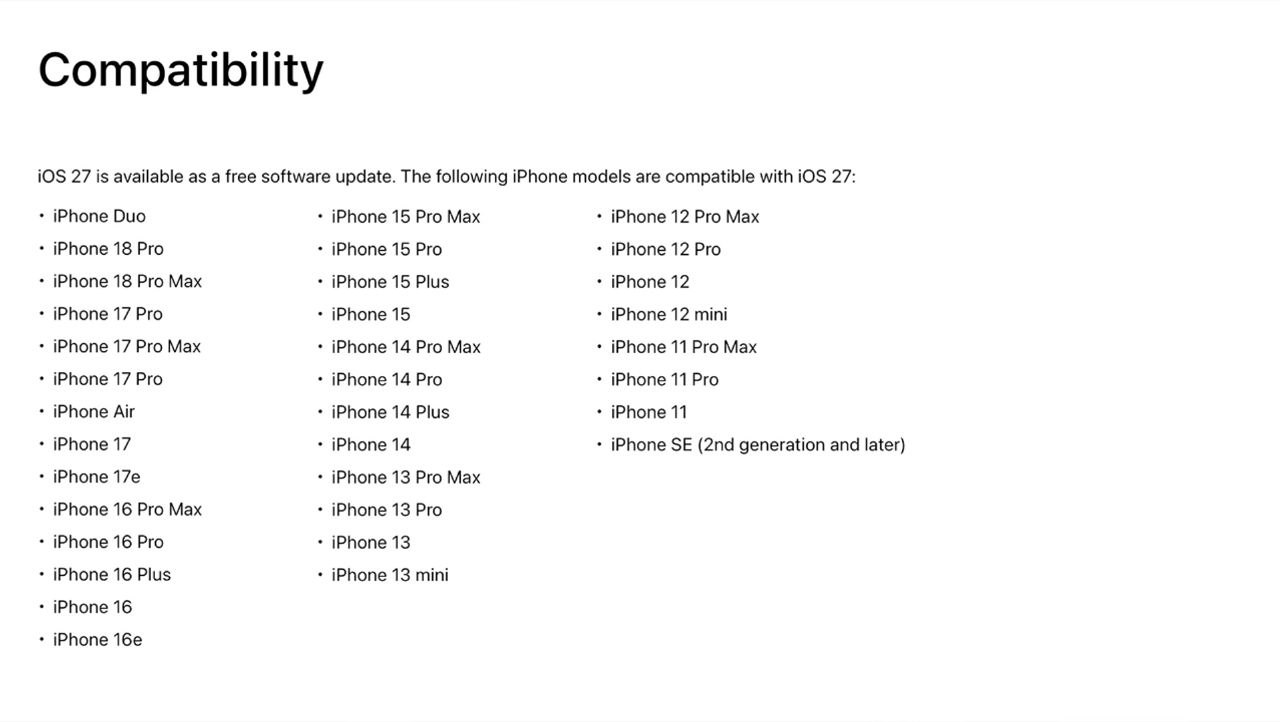
Apple first showed iOS 27 at WWDC in June 2026 and spent the summer polishing it through developer and public betas before releasing it widely on September 14. It's a free update available now through Settings > General > Software Update.
iOS 27 carries over the exact same device compatibility list as iOS 26, so nothing has been dropped this year, a genuinely unusual move for Apple. That means the iPhone 11, iPhone 11 Pro, iPhone 11 Pro Max, and iPhone SE (2nd generation) all remain supported alongside every newer model, including this year's iPhone 18 Pro lineup. Compatibility splits into three practical tiers, though:
- iPhone 11 through iPhone 14, and the standard iPhone 15 and 15 Plus: get iOS 27's design refinements, performance improvements, and non-AI features, but not Siri AI or Apple Intelligence.
- iPhone 15 Pro, iPhone 15 Pro Max, and every iPhone 16 model or newer: get Siri AI and the core Apple Intelligence feature set.
- iPhone 17 Pro, iPhone 17 Pro Max, iPhone Air, and this year's iPhone 18 Pro, iPhone 18 Pro Max, and iPhone Duo: additionally get the most demanding Siri AI features, like expressive voice customization and the most advanced dictation, which run on Apple's most powerful on-device model.
2. The New Siri AI
Siri AI is Apple's redesigned assistant, and it's the standout feature of iOS 27. Instead of short, rigid replies, Siri AI can hold a real conversation: it remembers earlier questions in the same chat, accepts open-ended follow-up questions, and understands more complex natural language than the old Siri ever did.
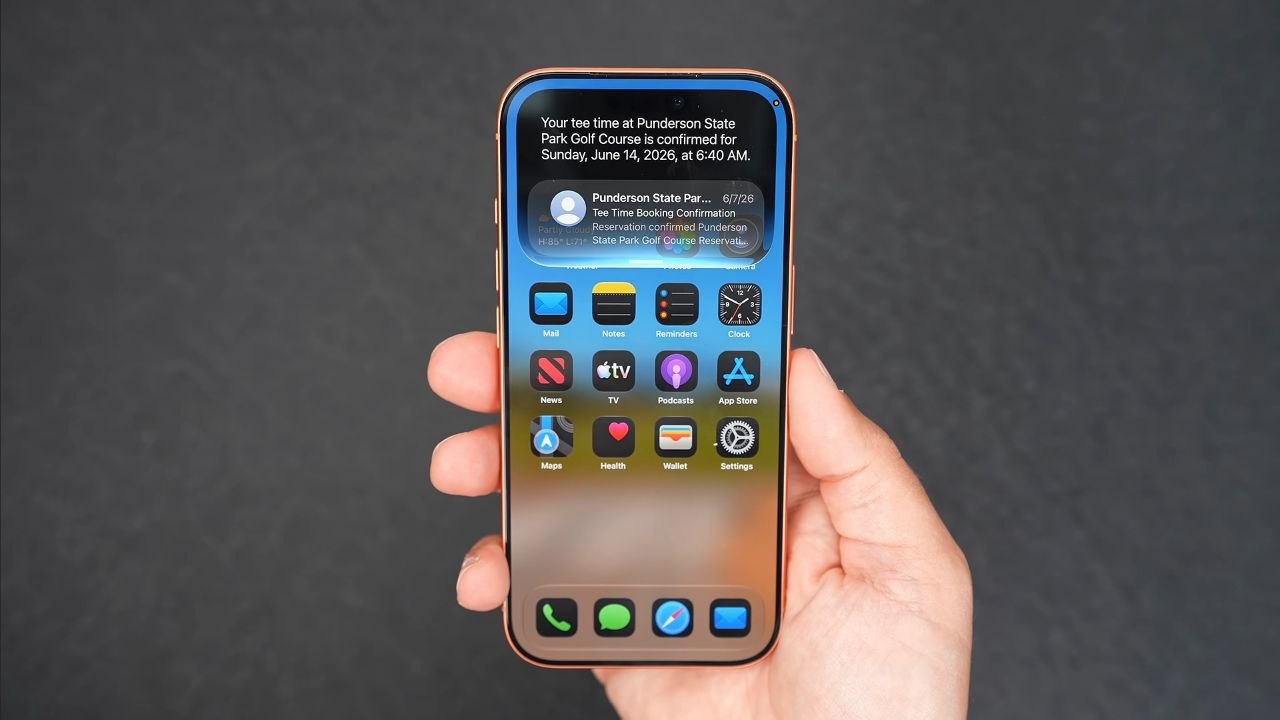
Personal context is a big part of what makes it useful. Siri AI can draw on details stored in your Messages, Mail, Photos, and Notes to answer questions, so you could ask it to dig up an address buried in an old message or find a file you can't remember the name of. It also has onscreen awareness, letting it act on whatever you're currently looking at, like saving an address from a message straight to Contacts or adding an event to Calendar without leaving the app you're in. Some processing happens entirely on your iPhone, while more demanding requests route through Apple's Private Cloud Compute servers, which Apple says are designed so it cannot read your data; the most demanding requests can even run on an expanded version of Private Cloud Compute hosted on Google Cloud infrastructure.
3. Siri Setup, Waitlist, and Availability
Here's the part that catches a lot of people off guard: having a compatible iPhone doesn't mean Siri AI works the moment you update. Apple is gating access behind a waitlist. To join, go to Settings > Siri, then tap Try Siri AI (Beta) and follow the prompts. Apple shows a dynamic wait-time estimate that can change based on demand, and sends a notification once your access is ready. During the beta period, waits ranged from a few minutes to over a week; some users are reporting near-instant access since the public launch, while others are still waiting.
There are further limits once you're in. Siri AI launches in English only, with French, Japanese, Korean, Portuguese, and Spanish expected to follow in October, likely alongside an iOS 27.1 update. Apple also says Siri AI is subject to daily usage limits since it relies on server-side models, with expanded access available through most iCloud+ plans and additional paid tiers coming later. On top of that, Siri AI is not available in the European Union at launch due to the Digital Markets Act, and it's also unavailable in China while Apple works through local regulatory approval.
4. New Siri Interface and Dedicated App
For the first time, Siri has its own standalone app on iPhone, iPad, and Mac, and it looks and behaves a lot like a chatbot such as ChatGPT or Claude. Inside, you get a conversation view styled like an iMessage thread, complete with chat bubbles and an "Ask Siri" prompt at the bottom. You can type or switch to voice with a tap, and unlike the old Siri, which forgot everything after a single reply, the app keeps your full conversation so you can ask follow-up questions without repeating context.
The app also keeps a running history of past chats that you can scroll back through, pin for quick access, or delete individually. In Settings, you can control what the app opens to (Recent Conversations or a fresh chat), how long conversations are kept (30 days, 1 year, or forever), and how many lines of preview text show in the list.
5. Conversation Syncing and Siri Voices
Siri conversations now sync privately across your Apple devices through iCloud, so you can start a question on your iPhone and pick it back up on your iPad or Mac without losing the thread. You control this syncing from Settings > [Your Name] > iCloud.
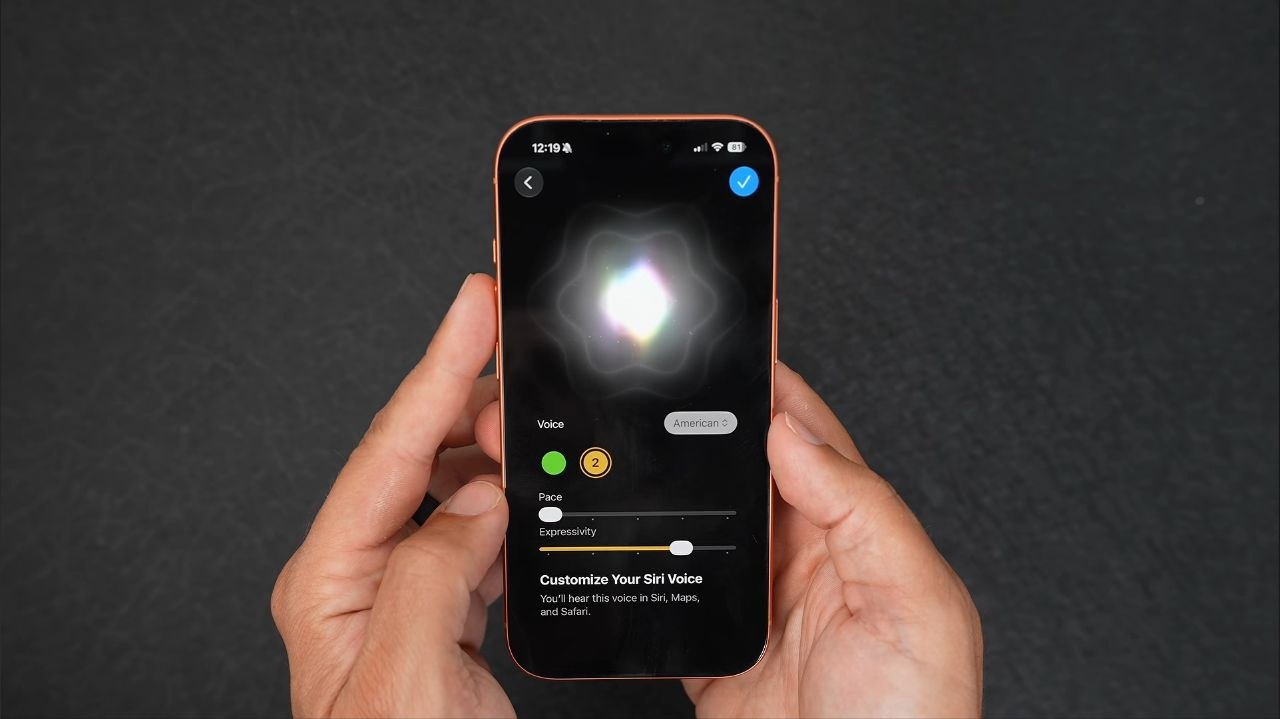
Siri also gets noticeably more natural voices this year, with new controls for tone and personality. However, the deeper voice controls, letting you tune expressivity and pace, are limited to devices with Apple's most powerful on-device model: the iPhone 17 Pro, iPhone 17 Pro Max, iPhone Air, iPhone 18 Pro, iPhone 18 Pro Max, and iPhone Duo. Every iPhone from the iPhone 15 Pro onward gets Siri AI itself, but only these newer models get the full voice customization on top of it.
6. Liquid Glass Customization
Apple introduced its translucent Liquid Glass design in iOS 26, and reactions were mixed. iOS 27 keeps the same look but fixes the biggest complaints:
- More uniform refraction and stronger contrast make text easier to read over busy backgrounds
- App icons gained extra layers of glass for more depth and sharper detail
- Navigation bars, menus, and buttons now stand out more clearly from the content behind them
- A new slider in Settings lets you choose how see-through the effect looks, from fully clear to a more solid, tinted style
If you found Liquid Glass distracting in iOS 26, the new slider is the fastest way to tone it down without losing the visual style entirely.
7. Visual Intelligence and Siri Camera Mode
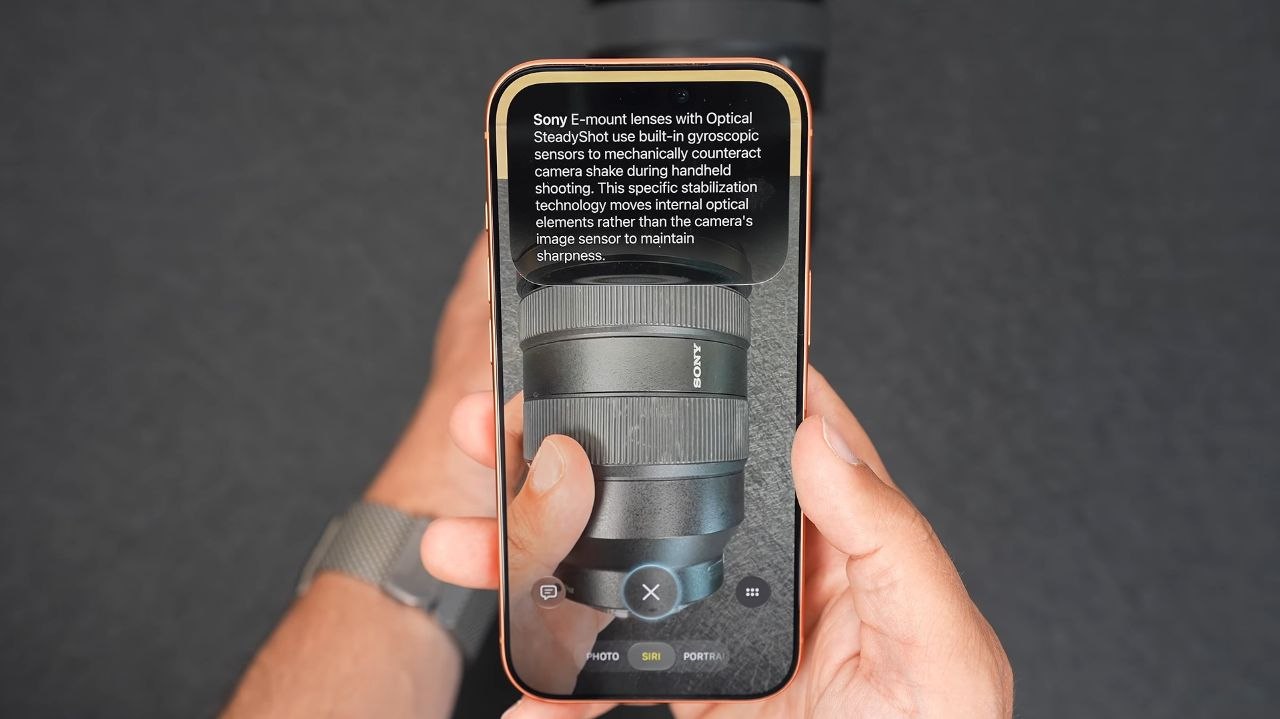
Visual Intelligence, the feature that lets your iPhone identify objects and answer questions about what your camera sees, now lives inside a dedicated Siri mode in the Camera app. Open the camera, point it at something, and Siri can look up nutrition facts on food, pull details about a landmark, or search the web for a product you're looking at. You can also attach a screenshot or photo directly to a Siri question for extra context, or long-press an image in Safari to ask Siri about it without leaving the browser.
One practical example Apple has highlighted: point Siri Camera mode at a restaurant receipt and it can offer to split the bill with Apple Cash, opening Wallet with options to request payment from others or pay your own share.
8. Smarter Shortcuts
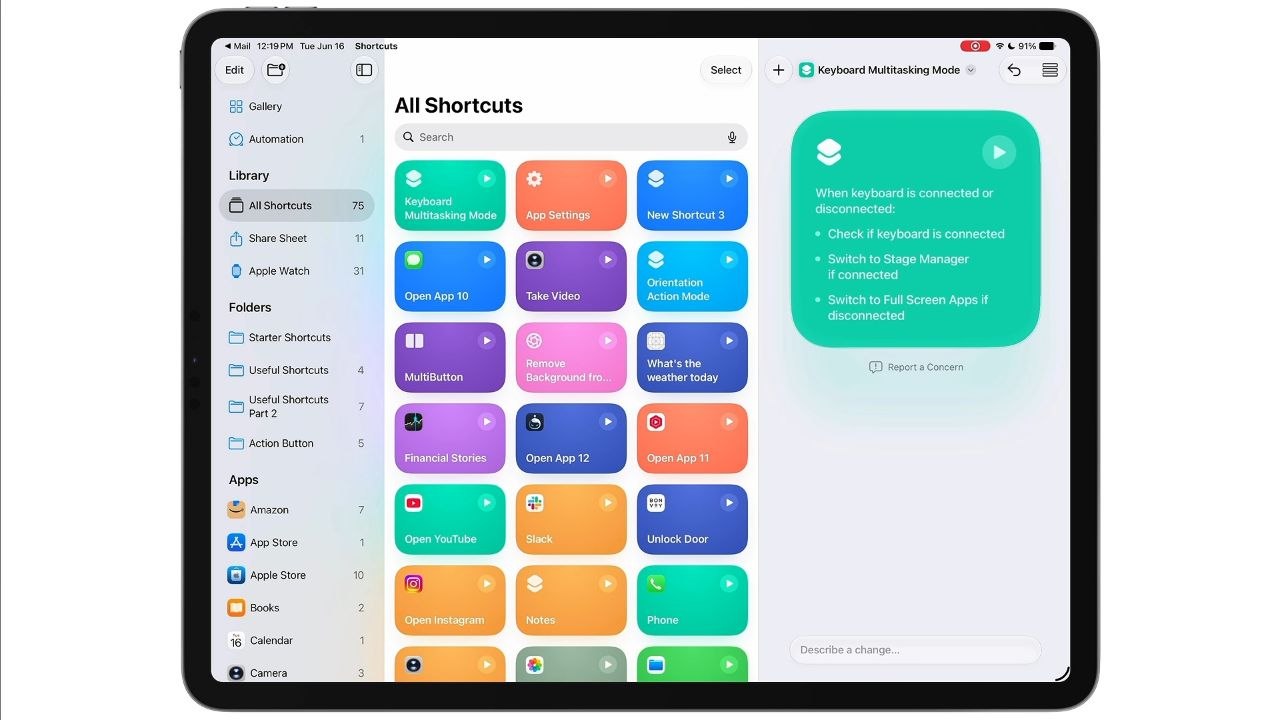
Building automations in the Shortcuts app used to mean manually assembling steps. In iOS 27, you can simply describe the shortcut or automation you want in plain language, and Apple Intelligence builds it for you, similar to the "vibe coding" approach that's become common in AI coding tools. It's one of the more genuinely time-saving additions in the update if you've ever wanted a custom automation but didn't want to learn Shortcuts' visual scripting.
9. Safari Updates
Safari gets a meaningful set of upgrades in iOS 27. Tabs, bookmarks, and your Reading List can now be automatically grouped by topic, making it easier to find related pages later. A new Notify Me feature watches a webpage on your behalf and alerts you to changes, like a price drop or an item coming back in stock. Describe an Extension lets you create a custom Safari extension just by explaining what you want it to do, without writing any code.
The Start Page has also been redesigned with a Resume Browsing section that surfaces recently closed tabs and pages open on your other Apple devices. Apple says Safari itself is more power efficient this year too, with faster JavaScript handling, quicker web app and start page loading, and smoother animations. Automatic tab grouping, custom extensions, and custom notifications all require Apple Intelligence, so they're limited to iPhone 15 Pro and newer.
10. Photos: Cleanup, Extend, and Spatial Reframing
The Photos app picks up several Apple Intelligence features aimed at fixing awkward shots after the fact:
- Clean Up: an upgraded distraction-removal tool that more naturally erases people or objects you didn't mean to capture
- Extend: generates realistic new image content beyond a photo's original edges, useful for filling a Lock Screen wallpaper that doesn't quite match your iPhone's aspect ratio
- Spatial Reframe: shifts the apparent camera angle of a photo after it's taken, using the spatial data your iPhone captures alongside the shot, which can rescue an image where the subject is off-center
A smaller but handy addition: you can now pull a single frame out of a video and save it as its own photo directly in the Photos app, instead of pausing playback and screenshotting around the video scrubber. Image Playground, Apple's on-device image generator, also gained new styles, including photorealistic results, though it carries daily usage caps with extra usage available through iCloud+.
11. Write with Siri and Mail
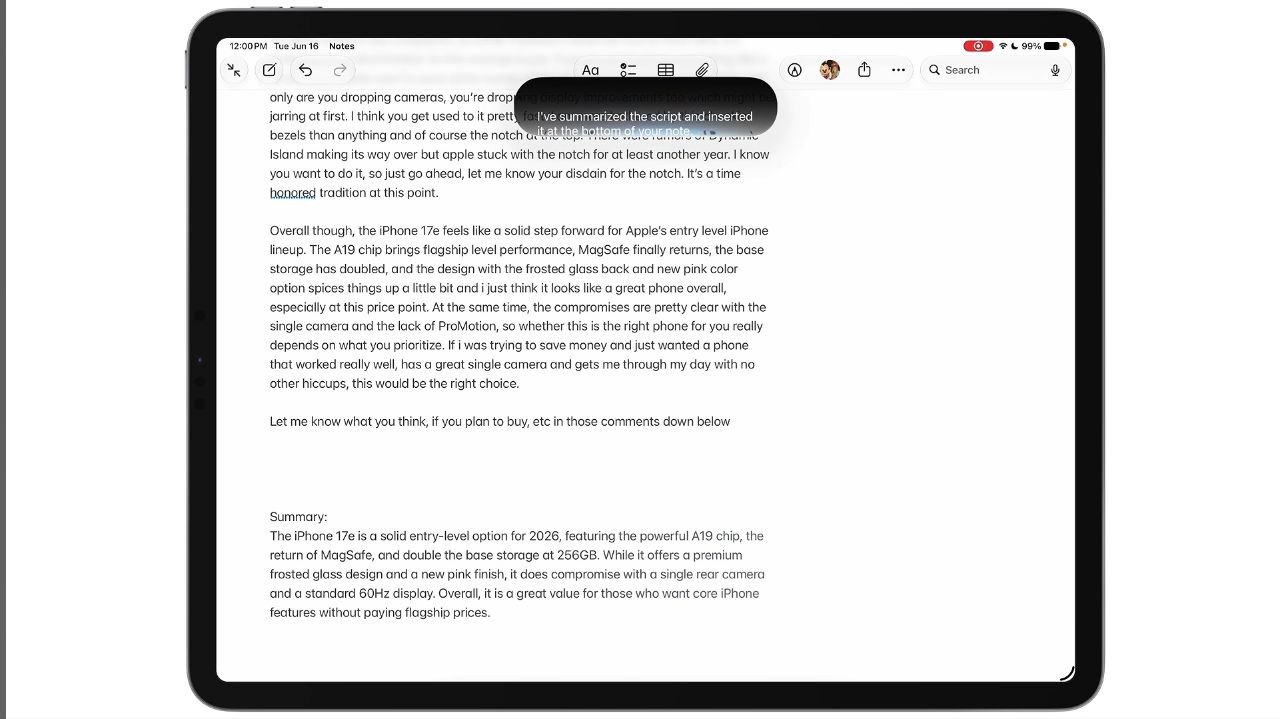
Write with Siri lets you generate a draft from scratch, edit something you've already written, or get feedback, virtually anywhere you can type on your iPhone. It's genuinely useful in Mail specifically, where Siri can personalize your writing style based on your relationship with the recipient, picking up on phrases and punctuation you've used with that person before so a reply still sounds like you rather than a generic AI draft.
12. Passwords and Wallet Updates
Apple originally planned an automatic password-fixing feature for the Passwords app, letting Apple Intelligence navigate to a site, sign in, and replace a weak or compromised password on your behalf. That feature was pulled from the betas before release, and Apple now says it's coming in a "future software update" rather than shipping with iOS 27 at launch, so don't expect to see it yet.
Wallet fares better. A new Create a Pass option lets you scan a physical pass with your camera to digitize it, or build one manually. Apple Card users get a new Recurring hub that lists upcoming subscription charges in calendar or list view, and participating hotels now offer an enhanced key experience with trip details and activity updates alongside your digital room key. An Insights feature that tracks spending across linked accounts is also rolling out, though it's currently limited to select territories and isn't yet available in the US despite appearing in earlier betas.
13. Messages Improvements
A handful of changes make daily messaging smoother: large photos and videos no longer delay the text sent alongside them, outgoing messages show a clear send indicator, and Tapback notifications are now grouped together instead of arriving one by one and cluttering your lock screen. One feature that didn't make the cut, at least for now, is AI-generated contextual reply suggestions in Messages; like the Passwords auto-fix feature, Apple pulled it from the betas and says it's coming in a later update.
14. Alarm Volume, Widgets, AirPods, and More
Settings > Sounds & Haptics gains a new Alarms and Timers section with a Match Ringtone Volume toggle. Turn it off and a dedicated slider appears, letting you drop your ringer volume down for the night while still setting your alarm loud enough to actually wake you up. The Home Screen also picks up extra-large widgets for Calendar, Photos, and Music, and you can now create your own custom Wallet passes for things Apple doesn't officially support.
AirPods get a genuinely substantial update of their own, though the best features are reserved for H2-chip models like AirPods Pro 3, AirPods 4, and AirPods Max 2. The headline addition is a long-requested three-band custom EQ, applied to everything you listen to through your AirPods rather than just Apple Music, and it carries over automatically when you pair the same AirPods with an iPad or Mac. The AirPods settings screen has also been reorganized into clearer categories: Audio & Routing, Hearing Health, Controls & Gestures, Live Translation, Accessibility, Battery, Find My, and Privacy. Live Translation can now be triggered by holding both stems, with downloadable language packs for offline use, and AirPods Pro 3 specifically gain GymKit heart rate syncing with compatible gym equipment, Precision Finding via Apple Watch, sleep detection that pauses audio automatically, and up to 67% more battery life in Transparency mode. Siri AI also works through AirPods via a connected iPhone, though it isn't a standalone AirPods feature and still needs a compatible iPhone nearby.
15. Performance and Final Thoughts
Apple put real effort into speed this year, and it shows in small, noticeable ways rather than one big headline feature. Apple says app launches can be up to 30% faster, and in daily use, AirDrop transfers complete quicker, the keyboard loads with less delay, and switching between Home Screen pages feels smoother. A new CPU scheduler decides which tasks get priority processing power, keeping background activity running without slowing down whatever you're actively doing, which is likely why iOS 27 still comfortably supports the iPhone 11, a phone from 2019 that struggled with some of Liquid Glass's rendering demands back in iOS 26.
Taken as a whole, iOS 27 is a rare update that improves nearly every part of the iPhone experience at once, even if its headline feature comes with more asterisks than Apple's keynote let on. Siri AI is a genuine leap in capability, but between the waitlist, the English-only launch, the EU and China restrictions, and the extra hardware needed for voice customization, it's less of a same-day upgrade than the marketing suggests. Everyone else benefits immediately from faster performance, a calmer Liquid Glass design, detailed new parental controls, and a long list of smaller Safari, Photos, Wallet, and AirPods improvements that don't need a waitlist at all.
Should You Update to iOS 27?
For most people, yes. The performance improvements alone make it worth installing, since apps open faster and the system feels more responsive, even on hardware from several years ago. Families will also benefit from the new parental control tools, which are some of the most detailed Apple has shipped. If Siri AI is the feature you're most excited about, go ahead and join the waitlist right after updating, since access is rolling out gradually and joining early is the only way to get in line.
The one group that should hold off briefly is anyone relying on a specific work app who wants to wait a week or two for developers to confirm full compatibility with the new Liquid Glass keyboard behavior. Everyone else can update right away.
People Also Ask
Summary
iOS 27 improves nearly every part of the iPhone experience at once, but it's also a more complicated launch than usual. Siri AI is Apple's real answer to conversational assistants, complete with its own app and cross-device syncing, but between the waitlist, English-only rollout, and regional restrictions, it will take longer to reach everyone than a typical iOS feature. Meanwhile, two features shown off during the beta, automatic password fixing and AI Messages suggestions, didn't make it into the final release at all. Everything else, from the calmer Liquid Glass design to faster performance, deeper parental controls, and a genuinely useful AirPods update, is available to everyone the moment they install it.
For more on Apple's newest hardware, check out our Apple iPhone Duo review, see how it compares in our iPhone 18 Pro review, browse our guide to the best foldable phones of 2026, or compare Apple's foldable against the competition in our Samsung Galaxy S26 Ultra review.
For Apple's own feature breakdown, visit the official iOS 27 page.